Apple's other LOGO
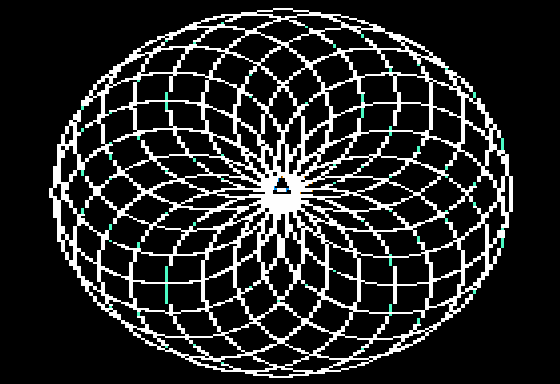
I created the image to the right using Apple LOGO. LOGO is a programming language dating back to 1967, made with the specific purpose of teaching concepts like logic and iteration in a visual and interactive way. Famous for "Turtle Graphics", it shares roots with things like G-code, vector graphics, and rose engines. Typically the programmer describes a path to the "turtle", which then travels along the path, drawing a line behind it. The original turtles were essentially robotic pens, with software graphics becoming an option circa 1969. Here in Apple LOGO the triangular icon represents the turtle.
How it was made
Here is the code I used to create the image as seen above:
REPEAT 20 [REPEAT 360 [FD 1 LT 1] LT 18]
This command essentially draws 20 circles which all begin at the same point. Each time a circle is completed, the facing of the turtle rotates 18 degrees clockwise. This creates the rosette pattern seen.
The image was created using Apple's variant for their IIe computers. This represents one of the classic spirograph patterns that people often make when playing around in LOGO.
Any odd colors you see in the image are normal artifacts from the Apple II HIRES graphics mode. If the turtle looks off center, it is not. The base of the triangle is the origin point of the lines, and the rest simply helps us see the current orientation. The turtle can be hidden or repositioned with a command. I chose to leave it in peace, where it finished, back where it began.

How to permute it
You might notice that the code I used is pretty short for what it does. You might also notice how easy it would be to change things around to see what happens. How serendipitous. If you'd like to try, here is a link to an online Logo Interpreter.
A few ideas
A simple way to change the number of circles in this pattern is to change the 20 and the 18 such that they are factors of 360. This will space them out evenly. For example 8*45=360:
REPEAT 8 [REPEAT 360 [FD 1 LT 1] LT 45]
There are a lot of ways you can reach 360; it is a highly composite number. How serendipitous. If you'd like to facet the circles or make other shapes, that would involve the middle bit.
This variation replaces the circles with octagons and reminds me of Escher:
REPEAT 8 [REPEAT 8 [FD 45 LT 45] LT 45]
This demonstrates that we don't need to stick to integers, and also that we can make cleanly faceted images very easily:
REPEAT 16 [REPEAT 16 [FD 22.5 LT 22.5] LT 22.5]
I noticed that keeping the spacing symmetrical and relating the orientation change at the beginning of each segment with the orientation change at the beginning of each shape tends to create perfectly faceted images. This should not have surprised me. But I was surprised.
LOGO is designed to help people gain an intuitve grasp of iterative logic and geometry. It's easy and quick to change your commands around to see what happens. It isn't particularly used in contemporary design, but if you were to try it and make something you like, you'll be happy to know it is easy to bring that pattern into the modern world. Since it simply describes the actions the turtle should iterate through, it is very possible to translate a LOGO command into a vector graphic or tool path.
Below is an SVG interpretation of the first image, but with the circles exchanged for icosagons. Mind you, this entire spiel is just scratching the surface. Logo was created with the mentality "Low floor, high ceiling." LOGO is a fully Turing complete language. LOGO can almost certainly run Doom. But for now, let's just try refactoring one line of code, written by a child.
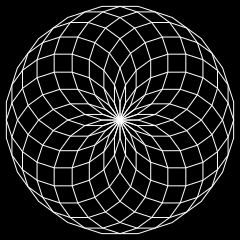
REPEAT 20 [REPEAT 20 [FD 18 LT 18] LT 18]